When AI builds a website, the hardest part to fill may be video made for the brand. Claude Code can write an entire front end in one pass, but it cannot generate video on its own, so the video slots in its layouts stay empty. Connecting it to Higgsfield MCP and the video model Seedance 2.5 closes that gap: one conversation can produce the brand footage, review it, fix it and then build a site around it. The workflow below covers the setup, the four-part prompt that shapes the result, and two example builds, with no developer, design software or camera crew involved.
Why Claude Code needs a video connector
Claude Code is good at generating UI components and writing styling rules, but it has no built-in media generation. Without help, the usual routine is to open a video tool in another browser tab, download the clips, and embed them in the project by hand.
MCP, the Model Context Protocol, is a standard that lets an AI model call outside tools. With Higgsfield connected through MCP, Claude calls video and image models directly, shows the finished clips inside the chat, and then places them in the site code. The connection persists across future projects, so the whole pipeline can run from natural-language prompts.
Setting it up takes a few steps:
- Open the Claude desktop app and go to Connectors.
- Add a custom connector and name it Higgsfield.
- Paste the remote MCP URL that Higgsfield provides and click Add.
- In the browser window that opens, authorize Claude to access your Higgsfield account.
- Once Claude’s settings show the connector as connected, tools such as Seedance 2.5 video generation, 4K upscaling and image generation become available.
What Seedance 2.5 adds
Three capabilities make Seedance 2.5 a good fit for website footage.
| Capability | What it does | Why it matters for a website |
|---|---|---|
| Region edits | Select a flawed area, such as a glitched logo or distorted text, and repair only that area | No full re-render, which could introduce new errors, and fewer generation credits spent |
| Reference consistency | Keep a product or character looking the same across camera angles and lighting from one reference image | Hero banners, product cards and feature clips match instead of looking disjointed |
| Longer clips | Generate up to 30 seconds in one pass, up from 15 seconds in Seedance 2.0 | Long scroll sequences come out in a single generation without stitching clips together |
Motion, texture detail and lighting realism are also strong, and Seedance 2.5 appears to be among the highest-fidelity video models available today. One limitation: it outputs 720p natively. For a premium site, ask Claude to upscale the clips to 4K so they stay crisp on high-density displays.
The four-block prompt
The structure of the prompt does most of the work. Split the instructions for the whole site into four blocks:
| Block | What goes in it | Example |
|---|---|---|
| Brand | Brand identity and aesthetic direction in one line | Cool steel, warm gold, an editorial serif font |
| Site | The list of page sections | Hero, Craft, Film, Specs, Waitlist |
| Films | Camera movement, lens focal length and lighting for each clip | A 35mm focal length |
| Greenlight | A rule that no site code is written until the footage is reviewed and approved | No code before approval |

▲ The four-block prompt structure
The Films and Greenlight blocks matter most. Most failed AI video generations seem to come from prompting for a vibe, such as “a luxury feel,” instead of concrete production terms. Describe how the camera moves, which focal length the lens uses and where the light comes from, and the output lands much closer to the intent.
Without the Greenlight rule, Claude often wires unreviewed or hallucinated footage straight into the site code, which leads to wasted iterations. Making approval a hard gate keeps both the visuals and the layout under your control.
Build one: a watch site that comes apart as you scroll
The first example is a site for a fictional luxury watch brand with a Swiss-minimalist look. Claude came up with the brand identity, the style guidelines and the site prompt itself, using the four-block format. The page is a scrollytelling site, meaning the story unfolds scene by scene as the visitor scrolls, and here the watch movement disassembles as the page moves. The product copy describes a timepiece with 231 components, a titanium case and 178 hand-polished chamfers.
The build went like this:
- Request two films: one inspecting the outside of the watch case, and one showing an exploded view of the movement with its gears and chamfers. Because Seedance 2.5 can generate up to 30 seconds at once, each continuous scroll sequence comes out in a single pass.
- Claude shows the finished clips in the chat for review before touching any source code.
- Toward the end of the second clip, the second hand stutters slightly. Instead of regenerating the whole clip, ask Claude to fix only that spot.
- Claude uses the Seedance 2.5 region edit to repair the second-hand motion. The rest of the clip stays untouched, and credits are saved.
- After the fixed footage is approved, Claude builds the scrollytelling page with high-resolution exploded views tied to scroll position.
Build two: a leather case site with a live 3D model
The second example is a fictional Parisian brand of made-to-order leather phone cases. Again, Claude produced the brand concept, a French name meaning “jewel case,” and the full site prompt.
Where the watch site relies on video, this one centers on a real-time 3D case model that Claude writes directly in code. The case rotates and tumbles as the visitor scrolls. Seedance 2.5 supplies macro footage of the leather grain and stitched edges, which Claude upscales to 4K and embeds as looping video.
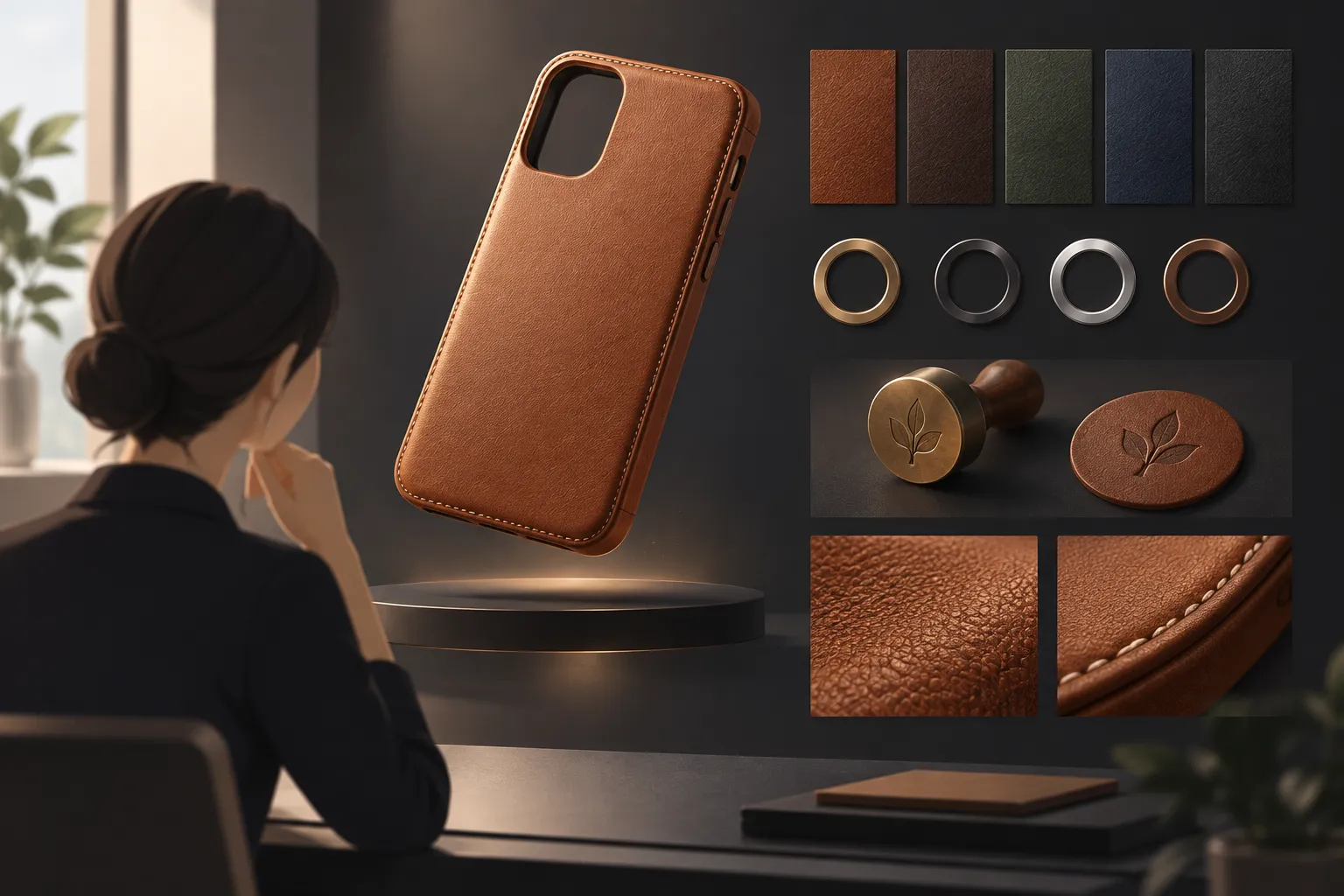
▲ A live 3D model and product customizer
At the bottom of the page sits a customizer. Visitors choose a colorway, hardware finish, lining style and debossed monogram, and the price updates live, for example from €158 to €177, next to a working reservation button. When the 3D model partly covered the editorial text midway down the page, a single request to adjust the spacing was enough for Claude to fix the layout.
Details that make a site look expensive
- Use one primary typeface in four proportional sizes.
- Leave generous whitespace.
- Ask Claude to upscale 720p clips to 4K.
- Fix small flaws with region edits rather than regenerating whole clips.
- Use any conversational AI model to adapt the four-block prompt to your own product or brand.
Key takeaways and how to start
With Higgsfield MCP connected, Claude Code can handle the whole asset pipeline in one place, from writing site code to generating video, upscaling to 4K and adjusting a responsive layout. The order of operations matters more than the tools: separate brand, structure and concrete camera direction, and do not let any code be written until you have reviewed and approved the footage.
To try it yourself:
- Add Higgsfield as a custom connector in the Claude desktop app and authorize your account.
- Write a Brand, Site, Films and Greenlight prompt for your own product or brand.
- In the Films block, specify camera movement, focal length and lighting angle.
- Review the generated clips, fix flaws with region edits, and only then let Claude write the site code.