Microsoft is trying to settle a long-running argument inside enterprise IT: how to let ordinary employees build their own apps, automations and AI agents without creating shadow IT or exposing sensitive data. Its answer in the Power Platform is the Personal Developer Environment (PDE), a private workspace for each maker that still sits under centrally enforced policy. Microsoft's own internal rollout, which moved makers out of a single crowded shared environment and into individual PDEs, is reported to have produced a 32% month-over-month increase in new workflow creation along with clearer ownership and better data governance.
The approach matters because the stakes have changed. Business users are no longer building simple chatbots that summarize documents. They are assembling autonomous agents that read requests, query databases, create records and trigger approvals. Any organization trying to build AI capability across its workforce, rather than concentrating it in a small engineering team, faces the same question Microsoft faced: how to give people room to build while keeping control over what those builds can touch.
Why the shared default environment stopped working
Organizations that adopt Microsoft Power Platform traditionally start with one shared default environment. Every licensed user can create apps and flows there, which makes it an easy first step into low-code development. The problem appears at scale. As thousands of employees add apps, flows and connectors, the environment turns into a sprawl that nobody can fully map. It becomes nearly impossible to tell who owns an application, whether it is still in use, what sensitive data it reaches, or whether it meets security requirements.
Microsoft lived this problem itself. Its internal shared default environment had accumulated tens of thousands of unmanaged applications and Power Automate workflows over several years, bringing oversharing, sensitive data exposure, inconsistent governance enforcement and operational difficulty managing low-code development at that volume. The company concluded that the shared default model was obsolete for enterprise-scale adoption.
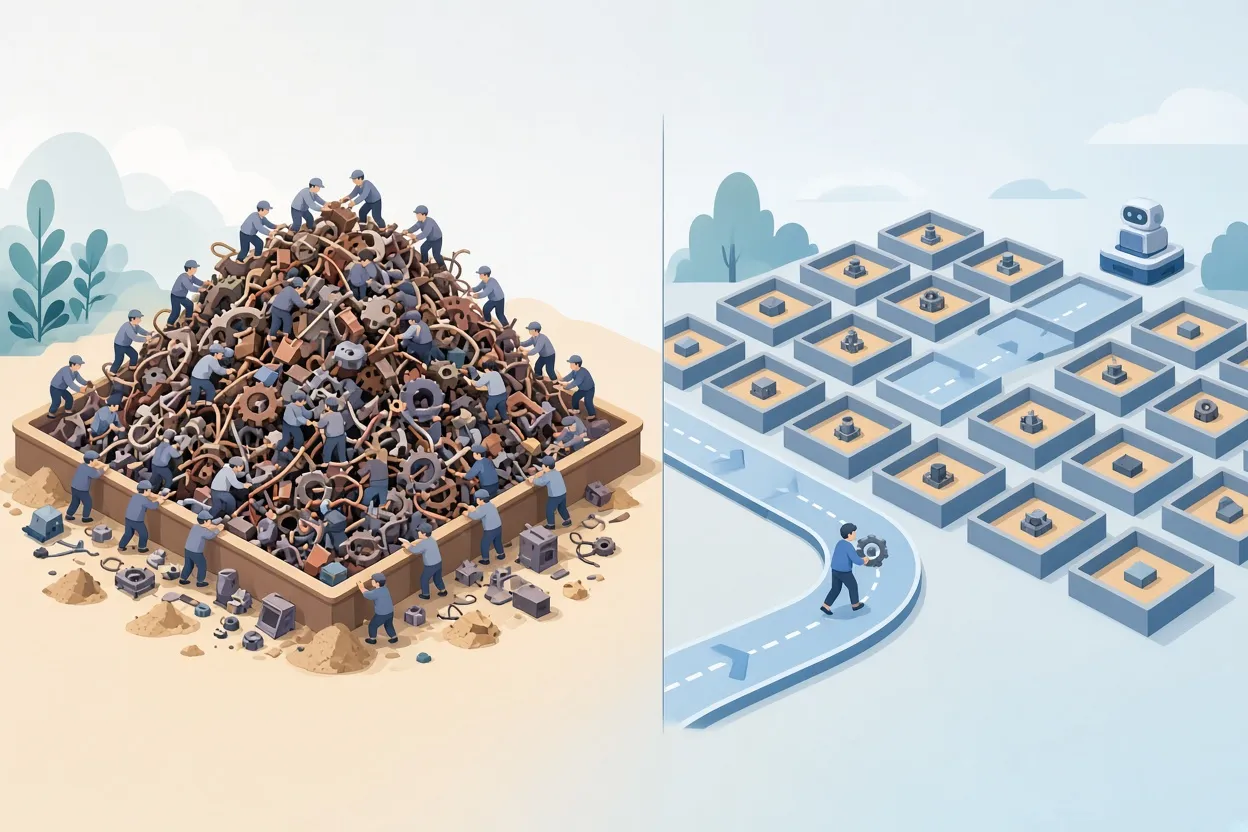
▲ One shared environment versus routed personal environments
What a Personal Developer Environment is
A PDE is a dedicated, isolated Power Platform workspace assigned to one maker. Instead of thousands of people working in one sandbox, each creator gets a private environment to design, build and test applications, automated flows and AI agents without interference. Other makers cannot see or change those assets unless they are explicitly invited. The maker can return to the environment at any time.
The mechanism that makes this practical is called environment routing. Once an administrator configures it, any user who starts creating something in a supported Power Platform tool is automatically sent to their own PDE, and the environment is provisioned on the spot if it does not exist yet. Nobody has to request a workspace or wait for IT to set one up.
The critical design point is that PDEs are not uncontrolled playgrounds. They can be run as Managed Environments, which means central IT policies, restrictions and compliance baselines apply to them automatically. Handing out isolated sandboxes without that managed layer would risk replacing one shadow IT problem with thousands of distributed silos.
The three administrative controls
Microsoft leans on three capabilities to govern PDEs at scale, so administrators define rules once rather than managing each environment by hand.
| Capability | What it does |
|---|---|
| Environment routing | Automatically places users in their own PDE when they create apps or agents, keeping them out of the shared default space |
| Environment groups | Aggregates many PDEs so administrators can enforce unified security and operational policies across all of them at once |
| Managed environments | Adds advanced controls such as usage analytics, granular sharing restrictions and automated solution checking |
Policies can be tiered across different environment groups. One practical way to organize them is by persona: standard business users, professional developers and specialist teams, each with its own connector policy. A team building tools on public data might get lenient connector rules, while applications that touch commercially sensitive data face strict Data Loss Prevention (DLP) rules, which are policies that control where data is allowed to flow.
Lifecycle governance belongs in the same plan. Employees leave, and environments go quiet. Automated, inactivity-based cleanup routines can reclaim capacity from dormant Dataverse-backed environments (Dataverse is the Power Platform's data storage layer), but critical business assets should be archived or migrated before cleanup runs.
Why AI agents raise the bar
Generative AI and autonomous agents make environment governance far more consequential. An employee can now use Microsoft Copilot Studio, Power Automate and low-code connectors to build, in hours, an agent that monitors incoming business requests, queries approved enterprise data sources, creates records in Microsoft Dataverse, posts updates in Microsoft Teams and triggers complex approval workflows. Building an integrated system like that previously required professional development teams, custom integrations and a dedicated project budget.
The flip side is that an agent with excessive permissions, flawed logic or an unvetted connector can cause a serious data breach or an unauthorized transaction. Unlike a static app, an agent acts on its own, so a misconfiguration can translate directly into a real business action. That is why isolating agents inside PDEs governed by central policy looks essential, not optional. Through environment groups, administrators can apply global guardrails to every PDE at once, including restrictions on sharing agents externally, approved connector lists and security policies.
Microsoft's governance roadmap also extends to server-side controls and support for the Model Context Protocol (MCP). MCP is a standardized protocol that lets AI models and agents interact with external tools and databases. As it becomes the common way for agents to reach tools, centralized oversight of which tools agents can access, what data they can retrieve and which actions they can execute becomes a core security task. Organizations should know precisely which backend systems each agent connects to, what permissions it holds and which human remains accountable for its output.
From sandbox to production
PDEs are strictly for prototyping, testing and small-scale use. They are not meant to run mission-critical workloads. Consider a project manager who builds a tracking tool: Power Apps for the interface, Dataverse to store project risks and site observations, Power Automate for approval notifications, and an AI agent that analyzes incoming project data, flags potential bottlenecks and generates recommendations. That is a legitimate business-led project, and the PDE is the right place to build and test it.
Once a tool like that demonstrates real organizational value, it must move to a shared, properly supported production environment. Application Lifecycle Management (ALM) solutions and Power Platform pipelines provide the structured path for that promotion. A key risk otherwise is that a simple productivity tool quietly becomes a business-critical dependency without IT knowing it exists or being able to support it.
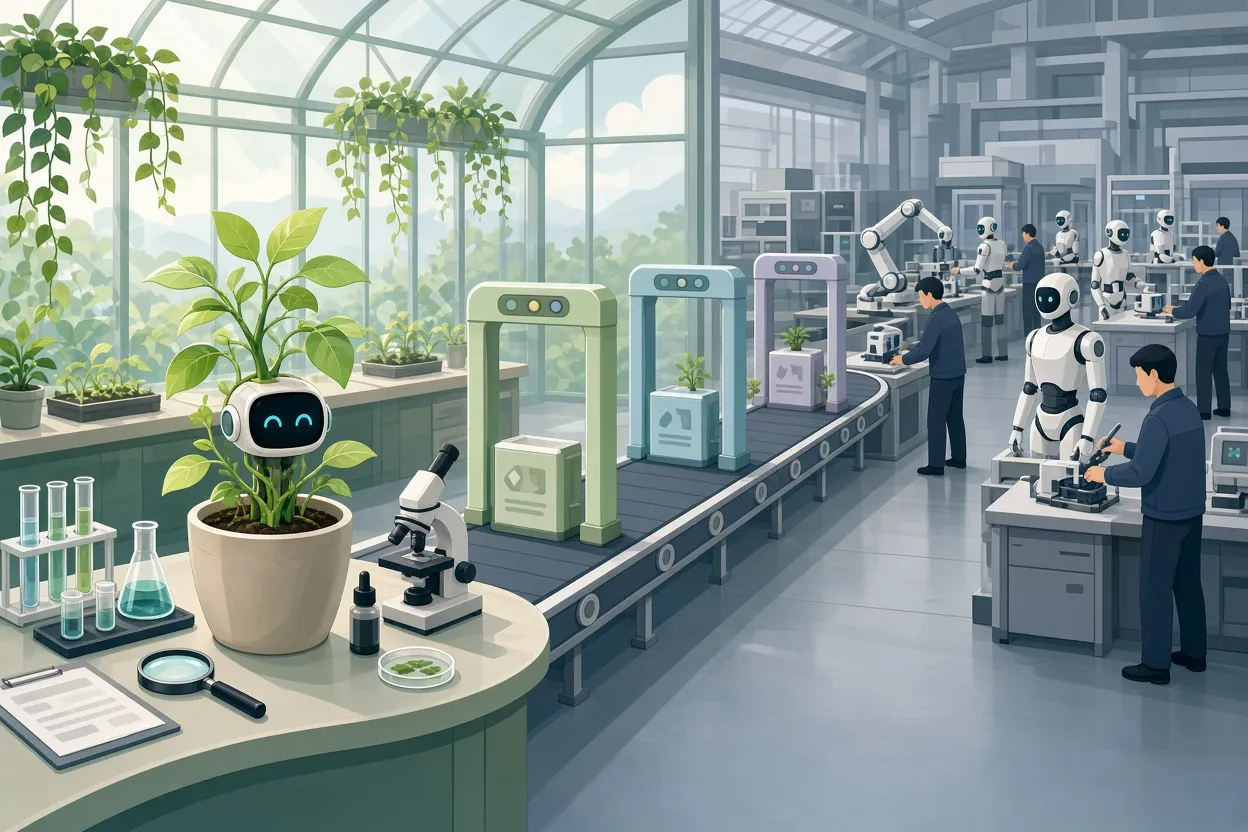
▲ Promotion path from prototype sandbox to production
Before any citizen-built app or agent is shared broadly, it should have formal ownership, support documentation and a security review. Licensing also needs deliberate planning. Having a PDE is not the same as holding production licensing entitlements; running enterprise solutions requires explicit planning across Power Apps, Power Platform and Microsoft Copilot Studio before applications spread across departments.
What this means for technology leaders
For CIOs, CTOs and CDOs, the argument comes down to three strategic shifts.
Rethink innovation enablement
The traditional gatekeeping model, in which IT prioritizes and builds every request, looks obsolete. Complex, enterprise-grade core systems still need direct IT engineering, but low-code and AI platforms let business users solve localized problems themselves, and the subject matter experts who feel the operational pain are often best placed to build the fix.
Fold AI agents into existing governance
Agents must be incorporated systematically into the enterprise security architecture rather than treated as a side project. That means DLP rules, identity and access management, security auditing and mandatory human-in-the-loop oversight, with full visibility into what each agent does.
Define a clear promotion pathway
A visible pipeline from experimentation to enterprise adoption prevents stealth applications from becoming critical without IT knowledge, and it tells makers exactly what they need to do to get a prototype into production.
The underlying claim is that governance done this way does not slow innovation; it accelerates it by removing the anxiety around compliance and security that otherwise makes organizations hesitate. Microsoft's 32% figure is a single internal case rather than a general result, but it suggests that guardrails and maker freedom can rise together.
Takeaways
For organizations that want AI capability embedded across the workforce rather than confined to a central team, the PDE model suggests a concrete playbook. It appears especially relevant where leadership wants business units to build their own agents but security teams are reluctant to open the door.
- Turn on environment routing so every new maker lands in a personal environment, never the shared default.
- Provision PDEs as Managed Environments so DLP rules and governance baselines apply automatically.
- Use environment groups to enforce connector lists, sharing limits and security policies across all PDEs at once, tiered by data sensitivity or persona.
- Set explicit boundaries and server controls on MCP connections so agents can reach only approved tools and databases.
- Audit agent permissions and sharing settings before any citizen-built agent touches core data stores such as Dataverse.
- Build ALM pipelines that move validated prototypes into supported production environments, with ownership, documentation and security review as prerequisites.
- Schedule inactivity-based cleanup for dormant environments, archiving important assets first.
- Plan licensing for Power Apps, Power Platform and Copilot Studio before tools spread across departments.
The goal is not to centralize all development in IT, and it is not to let everyone build whatever they want. It is to define the safety rails clearly enough that the number of employees who can build inside them keeps growing.