Anthropic has published an engineering guide, "Building always-on agents," that lays out how to design AI assistants that keep working while their owner is away from the keyboard. The central idea runs against the usual mental picture. An always-on agent does not watch dashboards around the clock. It sleeps almost all the time, wakes for a brief burst of work when an email, a payment or a timer fires, writes down what it did, and goes back to sleep. The guide reduces the whole design to five building blocks, which Anthropic calls primitives: an Inbox, Timers, Memory, Permissions and an Outbox. It also offers a clear recommendation for anyone who wants to try: build one narrow, read-only task first and let the agent earn more responsibility over time.
Why this pattern is practical now
Two shifts make background agents worth building today, according to the guide. The first is model judgment. Current frontier models are better at reading user intent and at telling the difference between an action they can take on their own and one that needs a human sign-off. That distinction is the whole game for an agent that acts while nobody is watching.
The second is cost. Anthropic reports that on a long-horizon coding benchmark, Claude Opus 5.5 costs 78% less per solved task than Claude Opus 5, compared with an average reduction of about 40% on standard workloads. That matters because an always-on agent racks up many small runs. One illustrative budget in the guide puts a single run at roughly 8,000 tokens, 38 runs in a day at about 293,000 tokens, and 1,140 runs in a month at about 9 million tokens. Token efficiency per run is what keeps that monthly total manageable.
The guide positions always-on agents against two familiar alternatives:
| Approach | How it behaves | Limitation |
|---|---|---|
| Chat session | User types, model answers, session waits | Purely reactive |
| Scheduled job (cron) | Fires at a fixed time with empty memory each run | Stateless, no continuity across days |
| Always-on agent | Wakes on events or timers, keeps notes between runs | Requires the five primitives below |
The sleep-and-run cycle
The unit of work is a "run." A trigger arrives, the agent wakes, completes a discrete task, records any state changes to persistent storage, and shuts down. Tokens are consumed only inside that window, so there is no bill for idle hours. A sample day in the guide shows the agent active at 04:50 to log a payment, at 08:00 to send a summary, at 12:00 to answer an email, at 16:20 to send a reply and at 20:25 to send a reminder, with nothing running in between.
The comparison Anthropic draws is to a competent human assistant who does not stare at an inbox all day. They check it when something arrives, deal with it, jot a note, and move on.
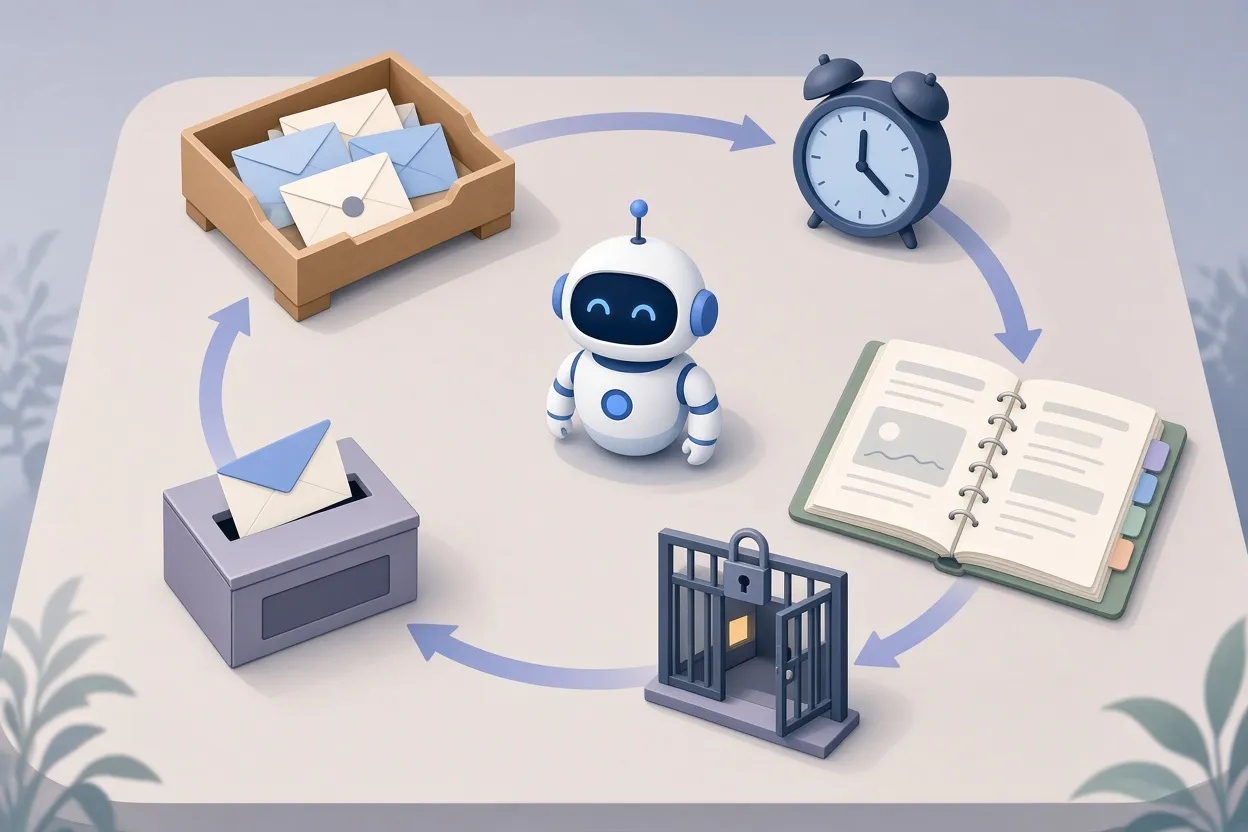
▲ The five primitives of an always-on agent
The five primitives
Inbox
The Inbox is a queue for the agent itself, not the user's email inbox. Every external event, whether a new email, a calendar invite, a direct instruction from the user, a webhook (an automated notification one service sends to another) or a payment confirmation, lands here first.
The guide explains why the buffer is essential. If events called the agent directly, two simultaneous triggers could spawn two agent instances that overwrite the same file, and a crash mid-task would lose the work entirely. The queue holds pending items, moves each job through clear statuses such as Pending, Working, Done and Crashed, and batches messages that arrive close together. If a user fires off three messages in a row, the agent can read all three and reply once with a single coherent answer.
Timers
Timers give the agent initiative. Without them it would only ever react. The guide splits them into two kinds:
- Schedules: recurring events the user defines, such as an inbox summary every morning at 8:00 AM.
- Follow-ups: one-off reminders the agent sets for itself, such as checking on Thursday morning whether an invoice is still unpaid.
Both live in a timer queue watched by an external scheduler. When a timer comes due, the scheduler drops a task into the Inbox, and that task wakes the agent.
Memory
Because the process ends and its working memory clears after each run, continuity depends on files on disk. The guide's governing rule is strict: save only what cannot be reliably looked up again from an external tool. Everything else should be fetched fresh.
Anthropic describes four categories of notes, indexed through a short index.md file that the agent reads on waking:
| File | Purpose |
|---|---|
| instructions.md | How the agent should behave |
| notes/preferences.md | What it has learned about the user |
| reported.md | What it has already told the user, to avoid duplicate alerts |
| progress/invoices.md and similar | Live progress on active tasks |
The agent pulls detailed sub-notes only when a task needs them, which keeps the context window small. Between runs, the guide describes an offline maintenance step it calls "Dreaming," in which the agent consolidates old session transcripts, prunes stale facts and distills patterns into clean preference entries such as "Team meets on Wednesdays" or "Always wants totals first." On the cost side, Anthropic recommends prompt caching for the fixed base context (instructions, tool definitions and the index) so the recurring portion of each run is not paid for in full every time, along with conversation compaction and fresh sessions when context grows.
Permissions
The guide calls this the highest-risk layer, because the agent acts while the user is absent. It describes three guardrails:
- Credential isolation. The model never sees raw API keys or passwords. Requests go through a proxy service that injects credentials outside the model's environment.
- Deterministic risk filtering. Rule-based checks automatically allow low-risk actions such as reading a calendar or drafting a reply, and hard-block dangerous ones such as mass file deletion.
- Human approval gates. High-impact decisions, such as emailing a VIP client, pause the action and send an approval request to the user's phone.
One detail stands out: while an escalated action waits for approval, the agent keeps working on unrelated tasks in the background instead of freezing.
Outbox
The Outbox controls how and when the agent talks to its owner. Every run ends in one of three outcomes: an informational update, a question, or silence when nothing warrants attention. The Outbox can also pace and defer messages, so a low-priority note does not wake the user in the middle of the night. Anthropic's design advice is to "start quiet and earn more of the user's attention over time." A comparison in the guide contrasts a quiet mode that sends one consolidated morning message with a noisy mode of ten redundant notifications that bury the one that mattered.
Together the five parts form a loop: a trigger enters the Inbox, the agent checks Timers and loads Memory, acts within Permission boundaries, updates Memory, and reports through the Outbox.
What happens when a new event arrives mid-run
The guide's baseline is that one queue has one active worker at a time, which rules out state collisions. When a new event lands while a run is in progress, the developer picks one of three strategies:
- Next Run: hold the event until the current task finishes. Best for independent batch jobs.
- Fold In: inject the new message into the running context. This suits conversational assistants. In one example, a user asks the agent to book a table for four tonight, then immediately adds "Actually, make it 5, somewhere near the office," and the agent folds both into a single confirmation for a table for five at 7:00 PM.
- Restart: cancel the current run and start a clean one with both inputs. Useful when the new input invalidates the old task.

▲ Invoice chaser deciding to skip, send or ask
A full day for an invoice-chasing agent
The guide walks through a small-business agent that chases unpaid invoices. At 8:00 AM a schedule timer drops a task into the Inbox and wakes the agent. It reads instructions.md, which says to be polite, chase no more than once a week and ask before emailing VIP clients, and then reads progress/invoices.md. It finds three overdue accounts:
| Invoice | Client | Decision |
|---|---|---|
| #1041 | Harbour Cafe | Already contacted Monday, so skipped |
| #1042 | Lane & Co | Standard client, polite reminder sent automatically |
| #1043 | Apex Group | VIP client, reminder held pending approval |
The agent sends an approval request for the Apex Group email to the user's phone through the Outbox, sets a follow-up timer for Thursday at 9:00 AM, updates its progress notes and is asleep again in under a minute. At 12:30 PM the user replies "Yes." That reply enters the Inbox, wakes the agent, the email goes out, the records update, and the agent sleeps until the next trigger.
Anthropic lists other workflows that fit the same pattern: an email helper that sorts mail into Clients and Receipts and alerts the user only for high-priority messages; a morning digest that gathers yesterday's sales (in the example, $1,240 across 14 orders, up 12%), the day's meetings and selected industry news; a follow-up coordinator for quotes and invoices; and a project board watcher that checks Jira, Trello or Linear at 6:00 PM and summarizes what moved to Done and what is stuck in Doing.
Four mistakes the guide warns against
- Notification overload. Alerting on trivial syncs trains users to ignore everything, and critical alerts get missed.
- Overprivileged access. Never hand an agent root credentials, broad bank access or unrestricted deletion rights. Scope tool definitions to the minimum needed.
- Redundant memory. Copying data that already lives in a calendar or accounting system into the agent's notes guarantees that the copy drifts out of sync.
- Scope creep on day one. A do-everything agent tends to fail in cascading ways. One reliable workflow should come first.
Tuning the agent's voice
Evaluation of an always-on agent, in Anthropic's framing, is mostly about calibrating how often it speaks. The guide recommends building evaluation sets to find the right communication threshold, and it offers a low-tech weekly habit: review every message the agent sent and label each one Useful, Skip (noise) or Wished-for (something the agent should have surfaced but did not). Direct feedback such as "Skip FYI messages, only notify me when a client replies" goes into the preferences note, and over successive weeks the Outbox judgment sharpens.
Where to start
The guide's advice for a first agent is deliberately modest. Do not build all five primitives at full depth on day one. Instead:
- Pick one reliable task, such as an 8:00 AM morning summary delivered over Telegram.
- Drive it with a simple cron schedule and a compact instructions.md.
- Grant read-only access to calendar and email.
- Put human approval in front of anything financial or anything that deletes.
- Once daily runs are stable, layer in follow-up timers, additional queues and proactive outreach.
Anthropic notes that Claude Code can help generate each primitive step by step, which may lower the barrier for developers who want to scaffold the loop quickly.
The takeaway is that "always-on" describes the experience, not the compute. A well-built background agent is asleep nearly all the time, wakes only for well-defined runs, remembers only what it cannot look up, holds no secrets of its own, and speaks only when it has something worth saying. Start with one quiet, read-only task, review what it sends each week, and expand its permissions and reach only as it proves itself.