Give Google Gemini’s Nano Banana 2.1, ChatGPT and Meta’s Muse the same prompts, and no single tool wins every job. In a head-to-head run of four real publishing tasks, a YouTube thumbnail, a promotional flyer, a campaign key visual and a two-slide carousel, Nano Banana 2.1 was by far the fastest and the most precise with small details, but it changed a real person’s face. ChatGPT took more than a minute per image yet kept the face closest to the original. Muse produced the most refined design work when paper textures and restrained layouts mattered. The practical lesson appears to be that the right tool depends on the task.
What Nano Banana 2.1 improves
Google released Nano Banana 2.1 as an image generation and editing model and says it improves visual design, mask-based editing (changing only a selected region of an image) and subject consistency, meaning the ability to draw the same person reliably across images. Side-by-side tests published shortly after the launch show gains that vary a lot by task.
| Test | What happened |
|---|---|
| Portrait of a woman from an identical JSON prompt | Nano Banana 2.1 rendered more natural, lifelike skin; ChatGPT Image 2.5 looked overly polished |
| Likeness across angles versus Nano Banana 2 | Both handled a frontal headshot; 2.1 held the face much better in side profiles and a beach scene |
| Beach snack stand built from several reference photos | 2.0 failed on scale, lighting and garbled menu text; Nano Banana Pro fixed the layout but kept artificial studio lighting; 2.1 had the best shadows and arrangement |
| Night gas station shot with a 24mm lens, camera 30 centimeters above wet pavement | The low angle worked, but a gas pump bled into a blur and the umbrella and paper cup ended up in the wrong hands |
On plain frontal portraits, the difference between 2.0 and 2.1 was hard to see, and the jump looks far less dramatic there than the launch excitement suggests. Where 2.1 clearly moves ahead is in complex scenes that combine many elements. Even in the snack stand scene, though, the counter items came out at slightly wrong sizes and the vendor’s face drifted from the reference photo.
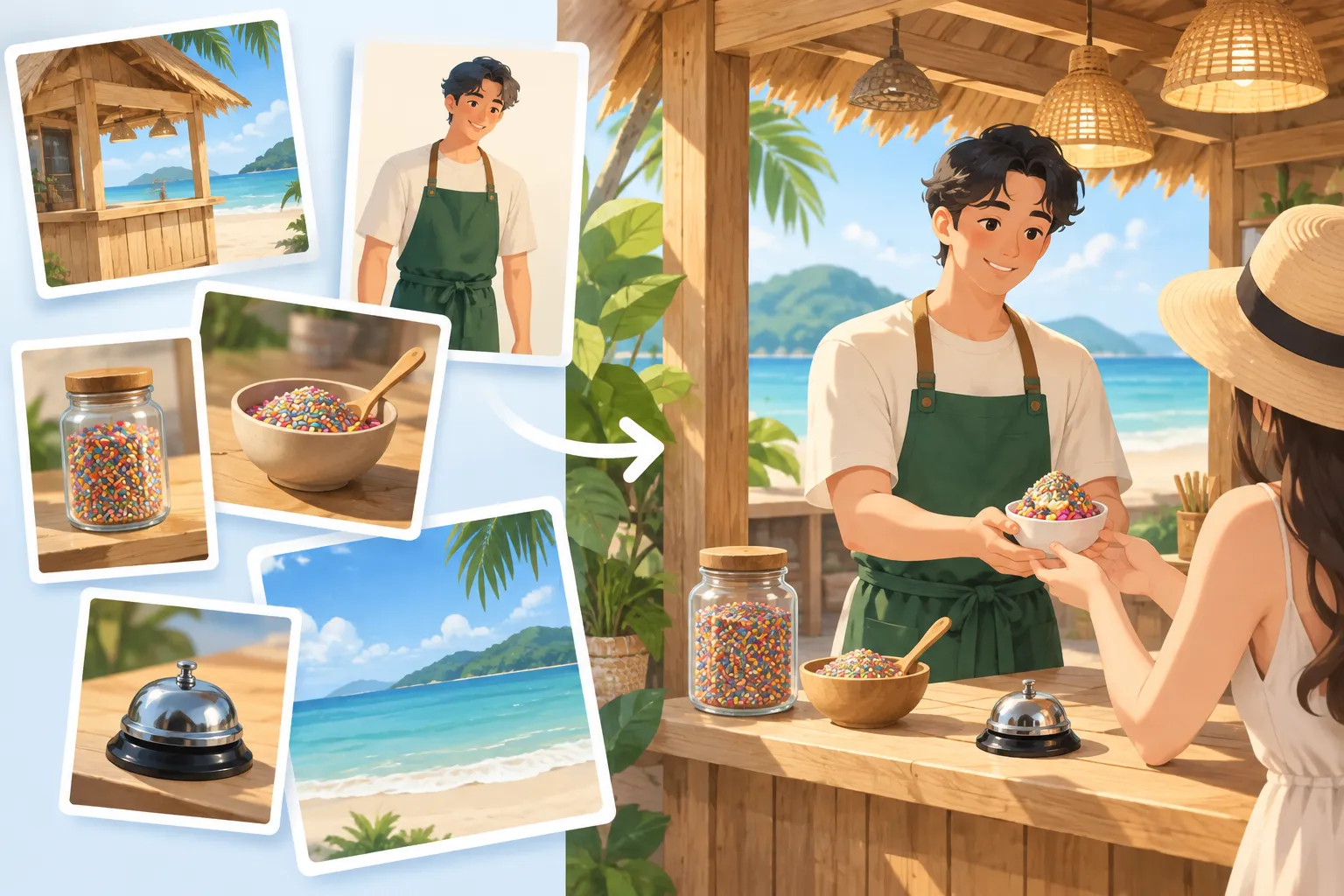
▲ Combining multiple reference images
Four tasks, one prompt each
The three tools were then run on four tasks close to everyday content work. The first task used a freshly taken photo of a real person, held in a neutral expression, as the reference. To judge raw prompt comprehension, only the first, unedited result from each tool counted. No inpainting or follow-up edits were allowed.
| Task | Nano Banana 2.1 in Gemini | ChatGPT | Muse |
|---|---|---|---|
| 16:9 thumbnail | 8 to 9 seconds; logo, background and text correct; face looked tired and altered | About 1 minute 3 seconds; closest likeness; dropped the cap logo | About 1 minute 2 seconds; solid background; eyes looked cartoonish |
| 4:5 promotional flyer | Under 15 seconds; perfect spelling; high contrast | About 1 minute 44 seconds; strong visual energy; small body text slightly off | About 1 minute; correct spelling; flat design |
| Campaign key visual | Plain and lacking depth | Dark contrast with floating cards | Most refined, with an embossed folder and paper textures |
| Two-slide carousel | Produced only the second slide | Built the cover, then a matching second slide | Delivered both slides at once, cleanly |
Thumbnail: speed versus likeness
The thumbnail prompt asked for the person centered from the chest up, a split background of saturated yellow and deep charcoal, and the large headline “WHICH ONE WINS?” in cream sans-serif letters. It also told the model to keep the facial structure, skin tone, hair and age, and not to beautify the subject into someone else.
Nano Banana 2.1 finished in 8 to 9 seconds and got the background, the headline and even the embroidered lion logo on the cap right. The face, however, looked fatigued, and its proportions no longer matched the reference. ChatGPT needed just over a minute and left the cap blank, but the face, expression and head tilt were the closest to reality. Muse handled the composition well, but the eyes looked lighter and slightly cartoonish. For a thumbnail, a recognizable face matters more than a small logo, so the preference in this round went to ChatGPT.
Flyer: all three can spell
The flyer called for a clean editorial grid, a warm cream background, charcoal type and electric lime highlights, plus a headline and several lines of copy. All three tools spelled everything correctly, a clear step up in text rendering from older image generators. Nano Banana 2.1 again was fastest and delivered a vibrant, high-contrast design. ChatGPT was slowest but produced a glossy 3D orb and a modern layout with strong visual energy. Muse followed every instruction, yet its design did not pop.
Key visual and carousel: where Muse shines
The third prompt described an abstract campaign image: an oversized index card standing on a charcoal floor, with a video frame, a podcast waveform, a square social post, a carousel stack and a newsletter page fanning out behind it under the headline “ONE IDEA, MANY MOVES.” Muse won this round with a polished studio look, tactile paper and an embossed folder. Gemini’s output was plain, and a portrait from earlier in the chat even lingered in its context.
The carousel task required a cover and an interior slide in the same palette and type. Gemini made only the interior slide and missed the point of the sequence. ChatGPT created the cover first and then used it as the reference for slide two. Muse rendered both slides together with clean margins and typography.
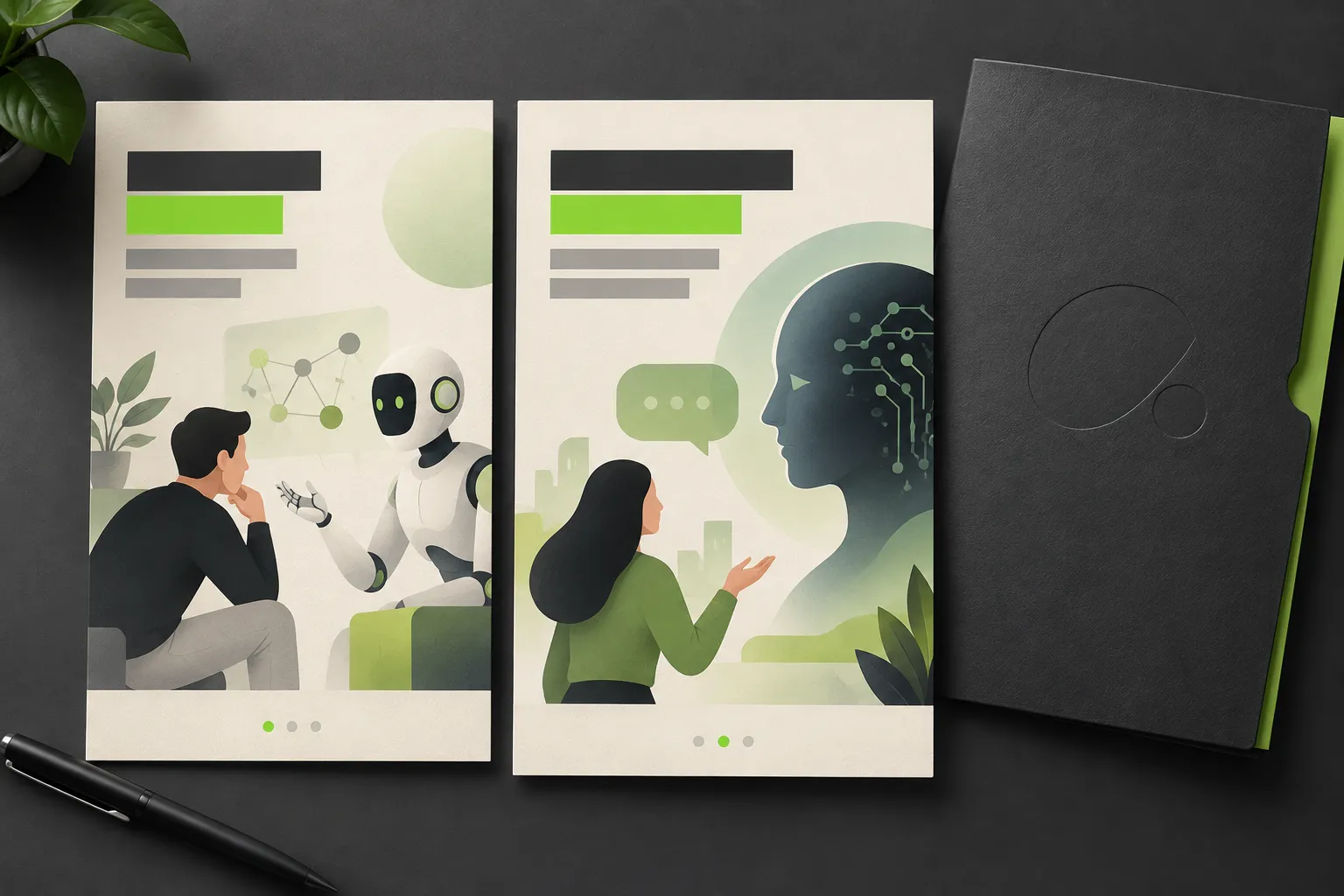
▲ Carousel continuity across slides
Prompt habits that made the difference
The prompts used in these tests share several habits that help on any of the three tools:
- Ban beautification explicitly. With a real reference photo, add a line such as “Do not beautify her into a different person” to limit airbrushing.
- Pin down the layout. Phrases like “chest up in the center” and “keep the face large and unobstructed” stop the subject from shrinking into the background.
- Name colors and aspect ratios. Spell out the color blocking and the ratio, such as 4:5 or 16:9, which also keeps comparisons fair.
- Quote the exact text. Put headlines inside quotation marks with the exact capitalization and punctuation.
- Use camera numbers. Lens focal length, camera height and tilt angle help produce a cinematic viewpoint. You can also show a strong prompt to an AI model and ask it to break down the structure into a template of your own.
- Anchor a series on slide one. For carousels, tell the model to treat the first slide as the reference for fonts, palette and layout.
- Keep it detailed but simple. Overly long prompts can mix up details like which hand holds which object. Concise, modular prompts are also easier to reuse by voice or text.
How to choose for your own work
These results suggest splitting work across tools rather than betting on one. Nano Banana 2.1 fits fast drafts and jobs where exact text and small logos matter. ChatGPT fits thumbnails with a real person’s face and multi-slide carousels. Muse may be the better pick for campaign visuals that rely on tactile, studio-style design. For general, everyday versatility, ChatGPT still came out as the most reliable creative assistant.
To run your own comparison:
- Pick a piece of content you make often and prepare one prompt and one reference photo.
- Judge only the first, unedited result from each tool, and record how long each one takes.
- Zoom in on eyes, facial details and small text, since a subtle color shift can make a thumbnail look fake.
- Go beyond a single frontal headshot and test multiple angles and multi-element scenes before deciding how big an upgrade really is.